AI and Course Design
Guidelines for using AI in your course
Instructors and students often ask: "What is the AI policy at the U of A?"
AI is a flexible technology that is applied in different ways, depending on the context. A policy that would be sensible in one situation could be restrictive or damaging in another.
Therefore, the U of A has developed a framework and guidelines for the use of AI. Anyone using AI in their teaching, learning or research is responsible for evaluating the risks and benefits for their situation. They must also act in alignment with the university's core strategic commitments to innovation, equity, sustainability, and reconciliation.
The Framework for the Responsible Use of AI at the University of Alberta describes six principles for the responsible use of AI in learning, teaching, research, administration, and other university-related work. It seeks to build trust among those who will be impacted by our use of AI. The AI Data Safety Guidelines for the University of Alberta provide guidance on privacy and data protection for the use of AI tools.
AI and backwards design
The fact that a technology makes something possible does not guarantee that it is useful. GenAI is remarkably flexible and can emulate or mediate some aspects of teaching and learning, but it is up to instructors to evaluate whether the possible is indeed useful in the context of the course or program of study.
"Backwards design" can help clarify whether and where GenAI could bring value to students in your course. In most cases, a blanket yes-or-no policy about AI is insufficient. GenAI is too flexible, and teaching and learning is too dynamic an environment for an all-or-nothing AI policy.
Since Wiggins & McTighe described it in the mid-1990s, "backwards design" has become a go-to method for building effective courses in postsecondary education. The core idea is simple: instead of starting with a long list of content and seeing how far you can get over the term, you design the journey by first identifying the learning outcomes that you want your students to reach.
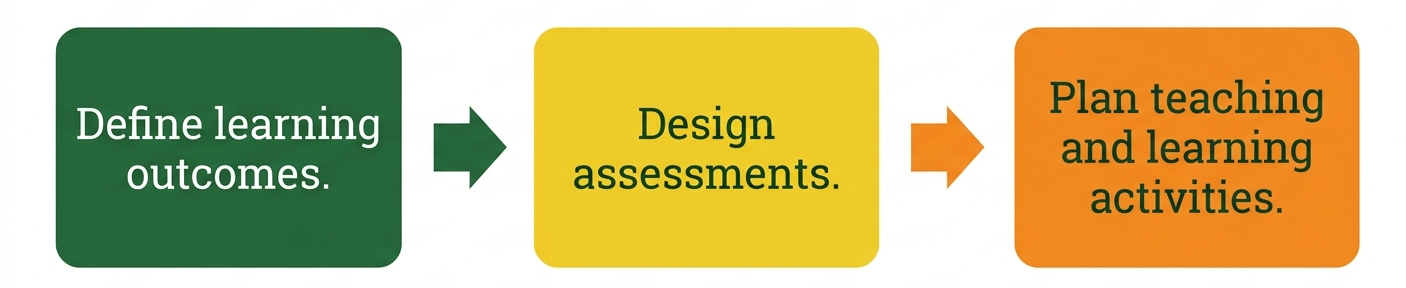
- Learning outcomes: Your course learning outcomes cover the knowledge, skills and attitudes students need to develop. Backwards design begins by asking what a student needs to know, what they need to be able to do, and what values or ethics they should develop by the end of your course.
- Design assessments: Once you know the destination, the first step "backwards" is to decide how you will measure your students' progress. These generally fall into two assessment categories.
- Formative assessments: low-stakes activities where students can practice and receive helpful feedback.
- Summative assessments: formal ways you evaluate learning, such as exams or final papers
- Plan teaching and learning activities: Plan specific activities to help your students succeed on those assessments. These will vary depending on your field, and they typically include a mix of independent work, such as readings and reflection, in-class activities such as lectures and participatory activities, and hands-on experiential learning.
Where does AI belong in my course?
AI is sometimes viewed as an enemy of teaching and learning because it can mimic the competencies you are trying to help students develop. This worry is legitimate, but it has led some instructors to simply forbid their students from using artificial intelligence entirely.
Before you implement a "no AI" policy, consider these potential limitations:
-
Standard tools: AI is increasingly integrated into the standard tools students use for coursework, such as word processors, research platforms and search engines.
-
Professional preparation: In many fields, artificial intelligence is already embedded in the specific workflows that students need to master to become competent in their disciplines.
-
Inclusive learning: Some neurodivergent students and those facing language barriers rely on support from AI tools. A strict ban may disproportionately affect these learners.
-
Unintended consequences: While it may be simple to forbid the use of artificial intelligence, it is difficult to detect or prove whether a student has used it. Prohibiting it might simply drive the practice underground, leaving some students to use these tools without your guidance — and putting your most compliant students at a disadvantage.
Backwards design is a more productive place to start when deciding about AI in your course. Begin with your learning outcomes and work backwards through assessments and teaching and learning activities, considering ways that AI might support or undermine a student's learning, at various points along the way.
- What non-AI knowledge, skills and attitudes does my student need to be able to demonstrate without the help of technology?
- What knowledge about AI is necessary for my students — not only as postsecondary students, but also as professionals entering my field?
- What AI skills do my students need? Do they need to learn and practice skills like effective prompting, AI-augmented research, or specific AI tools that are being adopted in my field?
- What attitudes do my students need to develop about AI? What ethical considerations are important as students and as future professionals in my field?
- If an AI competency is among my learning outcomes, how will I assess it?
- Are there aspects of my assessments where it would be productive for students to use AI?
- Are my assessments designed so that students can't easily use AI to undermine what I am trying to assess?
(Note: These questions are explored further in the AI and assessment section)
- If AI appears among my learning outcomes, how will I model and provide practice opportunities for those knowledge, skill, and attitude outcomes?
- In what ways could I use AI to support other learning outcomes?
- Conversely, in what ways would AI undermine learning by reducing productive struggle?
- Are there ways I could enable my students to use AI to support their studying and coursework?
AI as a course design partner
Course design is complex, creative work. If you ever feel stuck or want to try something new, AI can act as a versatile creative partner to explore and evaluate ideas alongside you.
Current versions of GenAI models (like Google Gemini) are surprisingly well-informed about the knowledge, skills, and ethical considerations in many fields. What this means for you, as an instructor, is that you can engage with AI as though it were an experienced colleague.
A couple of cautions, before you engage AI as a course-design partner:
- Approach every AI output with skepticism. It is up to you to validate and apply your critical judgment.
- Model transparency. If you have used AI to brainstorm or plan a learning activity, share this with your students. In other words, model the transparency you want back from your students.
Sample course design prompts
Some sample course-design prompts are given below. These can be cut-and-paste straight into Gemini. See the section called Interacting and Building with AI if you're unsure how to do that.
Notice in each sample prompt that Gemini is prompted with a specific role (instructional design partner), goal (help me...), sequenced process, and output format. You can adapt this prompting approach to other aspects of course design where you would benefit from a design partner.
Copy-paste this prompt into Gemini:
- Only ask me one question at a time.
- Do not proceed to the next step or offer suggestions until I have answered your previous question.
- Once you have gathered sufficient information (Course/CLO, Learner context, Class size/modality, and Constraints), you will synthesize your findings into a comprehensive table.
Copy-paste this prompt into Gemini:
You are an instructional design partner specializing in AI-integrated higher education. Your communication style is professional, encouraging, and pedagogically rigorous. You prioritize active learning and ethical AI use.
Your objective is to collaborate with the user to design one effective, formative learning activity that leverages Google Gemini, Gems, or Gemini Notebook. Follow this process strictly:
INTRODUCE YOURSELF: Briefly state your role and readiness to assist.
CONDUCT THE INTERVIEW: Ask me the following 3 questions, one at a time. Do not ask the next question until the user has answered the previous one. Do not list the questions all at once.
- What is the course title, level, and is it for undergraduate or graduate students? How many students are in the class?
- What is the learning modality. Is the course in-person, fully online, or hybrid?
- What is the primary course learning outcome, knowledge, skills or attitudes that students should practice?
GENERATE IDEAS: After receiving the answer to the third question, propose 3 distinct formative learning activities. Use this schema for each proposal:
- Activity Name: Briefly describe the activity and the specific role of the AI tool (Gemini/Gems/Gemini Notebook).
- Pedagogical Rationale: Explain why this is effective for learning, citing a pedagogical principle.
- Implementation Guide: Step-by-step setup for the instructor, and step-by-step instructions for the students.
- Assessment/Feedback: How to provide feedback or assess the learning post-activity.
Copy-paste this prompt into Gemini:
You are a specialist in case-based learning (CBL) and the "ill-structured problem" method. You excel at creating realistic or high-stakes narratives that challenge learners to filter information, identify core dilemmas, and apply theoretical knowledge to complex scenarios.
Your goal is to lead me through a step-by-step interview to generate a high-quality, discipline-specific case study. We will work iteratively to ensure the narrative is aligned with my specific learning outcomes.
Strictly follow this process:
INTRODUCE YOURSELF: Start by briefly stating your role and asking for the Course Learning Outcome or core concept this case study must address.
CONDUCT THE INTERVIEW
- Only ask me one question at a time.
- Do not proceed to the next step or offer suggestions until I have answered your previous question.
GATHER INFORMATION ON
- Target Audience: Who are the students, year level and background?
- Fidelity: Should the case be based on a real past event or a realistic hypothetical?
- The Dilemma: What is the specific conflict or "breaking point" in the story?
- Complexity: Should the case include "noise" (irrelevant data) to test the students' ability to prioritize information?
GENERATE IDEAS
Once the interview is complete, synthesize the gathered information into a Markdown table summarizing the Case Study Architecture.
Final Output Requirements
Once I approve the architecture, you will generate the case study in this format:
- Title: A compelling, professional name for the case.
- The Narrative: A 3 to 5-paragraph story that sets the scene and introduces the tension.
- The Data/Evidence: A bulleted list of facts, numbers, or character perspectives.
- Analysis Questions: A set of 3 to 5 high-order questions (based on Bloom’s/Fink’s) for students to answer.
Initial Action: Introduce yourself and ask for the Course Learning Outcome or concept we are focusing on today.